

The enhanced UI on your website depends on a unified icon, plus consistency and scalability. Conversion to webfonts to SVG icons offers customizable figures that highlight text that can be resizable and usable.
Gather Your SVG Icons
Start with clean, minimized SVG files, one icon per. Make sure that paths are optimized (no redundant metadata and no too complex elements).
Select a Webfont Generation Tool
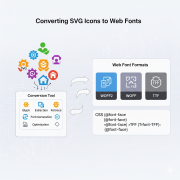 To make conversion easier, there are several good tools:
- Icomoon
- Fontello
- FontForge
Icomoon is very balanced between simplicity and customization in most workflows.
Import SVGs and Assign Codes
Load every SVG icon into the tool of your choice.
Create Fonts and Stylesheet
After giving icons, create the webfont, and this normally contains:
- woff / woff2 – optimized to be used in modern browsers.
- eot / .ttf – and to be compatible on the legacy side.
- svg – older iOS/WebKit browsers
- CSS file (or SCSS) – includes the declarations of the font-face and the definition of the classes of icons.
Integrate into Your Project
Include the font files and stylesheet generated in your web project, either as direct, static files, a bundler, or CDN-hosting. Connect the stylesheet using the HTML head. Add styling such as font size, color, CSS transitions, or hover states as you would with text.
Accessibility & Optimization
- Accessibility: Mark decorative icons by adding aria-hidden=”true,” or apply an empty aria-label in other ways.
- File Size: Compact glyphs are used without use to optimize font size. A lot of them provide subsetting so that you can only have the icons you require.
Maintenance & Updates
Keep a clean source SVG list and mapping. When introducing new icons:
- Add to the SVG set.
- Reassign codes (or reuse possible ones).
- Regenerate fonts and CSS.
- Update your project. Automate the workflow through script or CI pipelines, where necessary.
Summary
Turn your SVG icon library into a webfont to have scalable, styleable, performant icons that can seamlessly fit your frontend. Write clean codepoints and class names, create optimized font files and CSS, and combine them responsibly, taking accessibility and maintainability into consideration, using tools such as Icomoon or Fontello. This makes your iconography clean and enhances the consistency and efficiency of your UI toolkits as your product develops.